 Tapmerge
In private testing
Your checks pass.
Your wrist says go.
Tapmerge is a calm queue of your pull requests, for GitHub, on your Apple Watch. See what needs you, read the risk at a glance, and release work that has already passed its checks. Everything happens on the watch.
Tapmerge is not on the App Store yet. Today's test build is read-only: it shows your queue, while merging is being proven on practice repositories first.
How it works
Three steps, and none of them needs an iPhone app.
Join the test list
Write to tapmerge@thoughtfulsteward.org. Testing is small for now, so we write back when a place opens.
Sign in on the watch
The watch shows a short code. You approve it in a browser on any device you have nearby. Your sign-in then stays in the watch's own Keychain.
Choose your repositories
You pick which repositories Tapmerge may see when you connect your account. The watch lists exactly those, and nothing else.
What it does
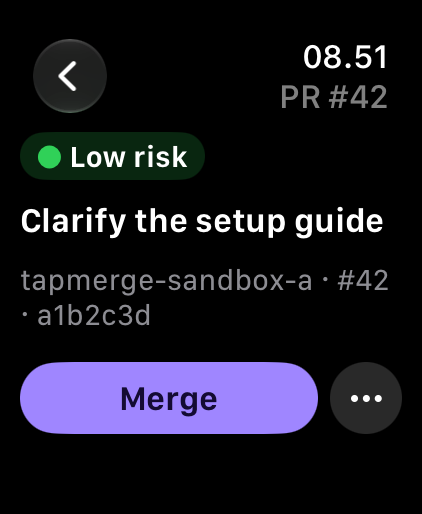
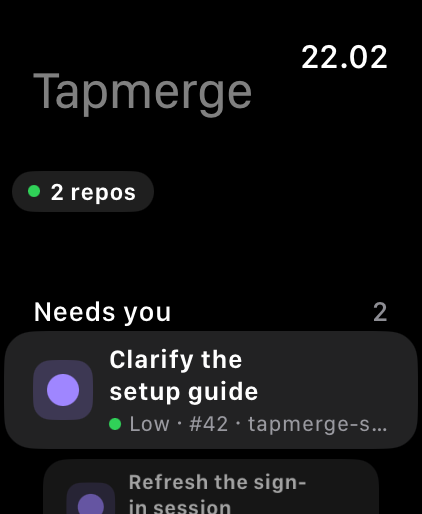
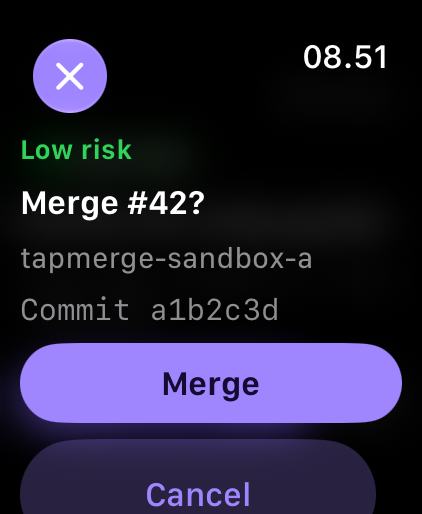
Sample data in every picture. Merging is shown as it works in practice testing.
See what needs you
Every open pull request across your chosen repositories in one list: what needs you now, and what is still waiting for checks.
Read the risk at a glance
Each card carries a colour from fixed, tested rules, so you can tell a wording fix from a change to how your code is built. The colour informs you. It never decides for you.
Go, wait or send backIn testing
Merge, Merge when ready, send a pull request back to its author or agent, or snooze it. These are being proven on practice repositories before they reach yours.
What it will never do
Think of an approval desk. Others write the proposals, your checks and branch rules examine them, and your wrist only says go, wait or send back.
Merge work that has not passed
If the checks are not a clear success, there is no Merge button anywhere. An unknown or failed state shows on the card and nothing merges.
Merge something you did not see
Every merge is pinned to the exact commit the card showed you. If someone pushes between your glance and your tap, the merge is refused.
Go around your rules
Tapmerge works under your normal branch rules and never asks to bypass them. It holds no permission over your build workflows, so a change to those is merged on GitHub itself.
Let an AI decide the risk
The risk colour comes from fixed rules that are tested, never from a model's opinion.
Where it stands, and privacy
In private testing
A small read-only build is in use today. No price is set yet, and trying it costs nothing.
No ads, no tracking
No account with us and no analytics. Your sign-in is kept in your watch's own Keychain, and no server of ours receives it. Apple's own testing service shares crash reports and feedback with us. Privacy policy (draft)
Common questions
Do I need my iPhone?
No. The queue, the cards, sign-in and settings all live on the watch. You only need a browser once, on any device, to approve the sign-in code.
Does it merge anything on its own?
No. Every merge waits for your confirmation. Merge when ready only finishes a merge you already confirmed, for that same commit, once its checks pass.
Which repositories can it see?
Only the ones you choose when you connect your account or organization. You can change that choice at any time in your account settings.
When can I get it?
It is in private testing and not on the App Store yet. Join the test list and we will write when a place opens.
Support
A repository is missing
The watch shows only repositories you connected. Open Connected repositories on the watch, then check that Tapmerge is installed on that account or organization and that the repository is selected.
The queue looks out of date
Tap Refresh beside the count. If a read fails, the watch says so on the card and names what it could not read.
Removing access
Sign out on the watch, then remove Tapmerge from the authorized apps in your account settings at GitHub. That withdraws its access for good.
Anything else, including a security concern: tapmerge@thoughtfulsteward.org.
More from Thoughtful Steward
TapprovalOn the App Store
Your coding agent asks, your wrist answers: approve, answer and follow Claude Code and Codex from your Apple Watch.